
Know where every job stands, while the work is still moving.
Works with

Crux does not replace it. QuickBooks® stays your accounting system of record, and approved invoices sync to it.
Crux is the financial control layer for general contractors. Invoices, approvals, and job cost run on one path, and every item carries an owner and a status.
Returned for missing information. The reason is on the record and the vendor has been notified.
Interactive sample environment using fictional project and financial data.
Your financial picture is only as current as its slowest handoff.
On most jobs the financial work is real and the record of it is somewhere else. Here is one week, and where each piece of it is still sitting.
None of the 6 items moved to Crux yet. Showing today's workflow.
- Invoice visibility
- TodayScattered across inboxes, text messages, and paper. With CruxOne working queue, each item with an owner and a status.
- Approval accountability
- TodayWho approved what is hard to reconstruct later. With CruxEvery decision has an owner and a documented outcome.
- Budget awareness
- TodayKnown days later, assembled by hand. With CruxThe budget position reflects approved activity as it builds.
- Month-end effort
- TodayReconciling spreadsheets against the books. With CruxApproved activity is already structured and coded.
- Supporting context
- TodayBackup lives in one person's inbox. With CruxLine-item context and documents stay on the record.
- Management reporting
- TodayA snapshot that is already out of date. With CruxA current project financial picture across active jobs.
A comparison of workflow control on a QuickBooks-dependent process. Illustrative of the operating difference, not a performance guarantee. QuickBooks stays the accounting system of record.
One connected path, from intake to the accounting boundary.
Every construction dollar takes the same route. Step through how Crux gives each stage an owner, a reason, and a documented outcome.
Crux sits between the field, the office, your vendors, and QuickBooks. Four parts, in the order money moves through them.
Capture vendor invoices, route them to the right approver, and see the status of every item. This is where the work enters Crux.
See committed and approved costs against budget by project, so attention lands where it matters.
Approved invoices sync to QuickBooks, so the accounting workflow stays current without re-keying.
Turn approved activity into a project financial view the team can read without assembling it first.
Below, one invoice walks the whole path.
- Ridgeline Supply Concrete Submitted
- Delta Mechanical HVAC Submitted
- Anchor Rebar Rebar Draft
The invoice lands in one Bill Tracker queue.
A vendor invoice appears in the working queue with an owner, instead of scattered across inboxes and glove boxes.
Explanatory illustration of the structured record. Not a product screenshot.
Illustrative figures, in thousands. Two labelled states, no timing implied.
- L1CompanyWhere each active job stands.
- L2ProjectBudget, committed, approved, variance.
- L3Cost categoryThe parts of the job, each with its position.
- L4ActivityThe approved and committed items in a category.
- L5RecordThe item and its approval decision.
Levels of explanation, not literal in-product drill-down.
An explanatory diagram of the accounting boundary. Not a product screenshot and not a QuickBooks interface.
How each source reaches Crux, submitted in Crux or brought in by your team, is set up for the way you work.
- Invoice appears in the Bill Tracker queue.
That is one invoice. See the whole financial control layer, module by module.
Judge Crux against your own workflow.
Not a project suite. Not a spreadsheet on top of QuickBooks. Here is the difference, and here is how to test it on your own jobs.
- Built around tasks, plans, and site coordination.
- Financial control is a side feature, not the point.
- Still leaves invoices, approvals, and job cost disconnected from the books.
- Purpose built for invoice control, approvals, and job cost.
- Keeps QuickBooks as the accounting system and adds control around it.
- Gives leadership a current financial picture of every project.
We walk through how invoices, approvals, and job cost travel between the field, the office, and QuickBooks right now.
In the session we follow one project's invoices from intake to approval to the project budget view, on your own numbers.
You decide where control improved and what it would take to run this across active projects.
Before that, you may want the receipts. See what financial control has produced, and how each result was reported.
Crux runs financial execution. QuickBooks stays the system of record.
Control means knowing exactly where your system ends. Crux handles intake, approvals, and job cost while the work moves, then hands approved bills across a boundary you can see.
- Invoice intake and cost-code context
- Routed approvals and exceptions
- Committed and approved job cost
- General ledger and accounts payable
- Financial statements
- The books of record
QuickBooks is a registered trademark of Intuit Inc. Crux is independent and not affiliated with, endorsed by, sponsored by, or certified by Intuit.
One financial truth, read from wherever you sit.
Owners, controllers, and project managers act on the same connected workflow. Each sees and controls the part that is theirs.
Where does project money stand right now?
See the jobs, approvals, and cost movements that need attention before they become surprises.
- Portfolio level financial visibility across active jobs.
- Earlier warning when a project comes under cost pressure.
- Confidence in where every project stands, without waiting for accounting.
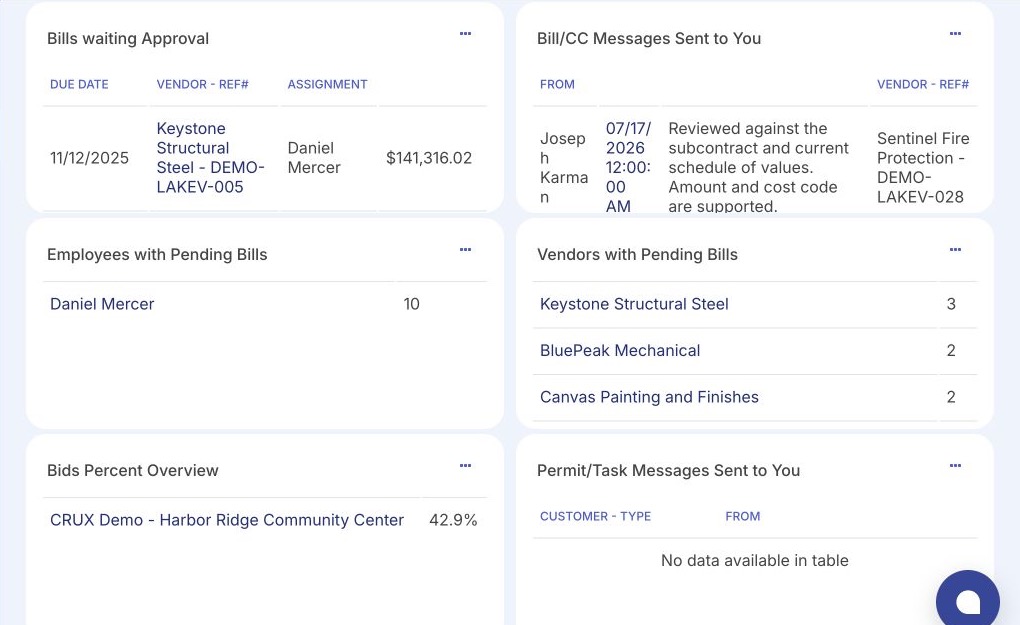
Invoices arrive from everywhere and approvals stall before the books.
Run one controlled path from invoice receipt through approval and the QuickBooks handoff.
- Centralized invoice intake with cost-code context.
- Traceable approval status and clear exceptions.
- Less duplicate entry and less chasing before accounting.
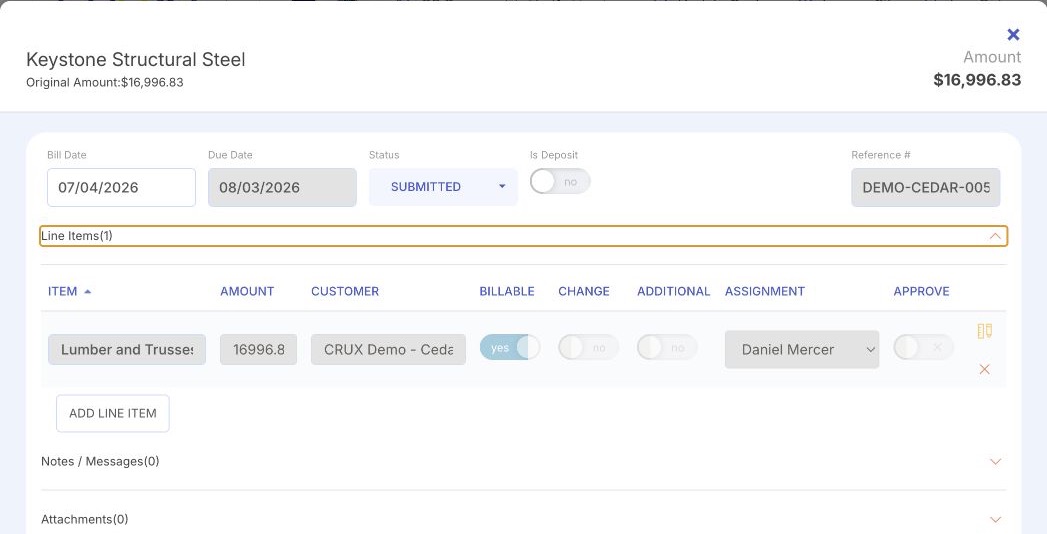
You own the outcome but see the cost impact after the decision.
Understand the cost impact of approvals and commitments while the work is still moving.
- A project-specific approval queue you control.
- Budget and cost-code context on every item.
- Faster, documented decisions on the job.
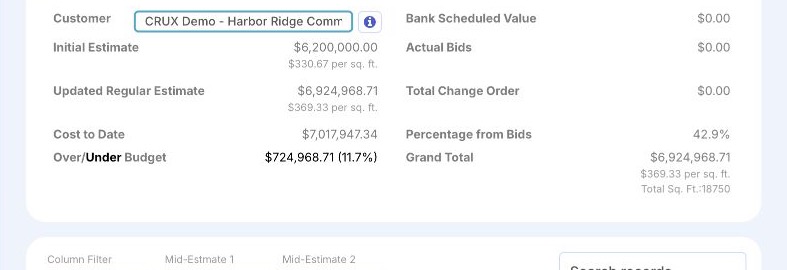
Know where a project stands without waiting on spreadsheets, phone calls, and month-end cleanup.
Less waiting to find out. More confidence in the number.
Spend less time chasing approvals, matching paperwork, and reconstructing what happened after the fact.
Less chasing and rework. More of a clean, documented trail.
Review what needs your attention and keep the work moving, without becoming the accounting department.
Less office friction. More time on the job.
How much time does invoice handling take?
Set two numbers you already know: invoices a month, and minutes to handle each one from intake to approval. The estimator turns them into hours a month, hours a year, and roughly how many working days that is, with the arithmetic shown in full. It is an operational estimate from your own inputs, not a quote or a guarantee of savings.
200 invoices × 12 minutes ÷ 60 = about 40 hours a month.
An operational estimate from your inputs, using round numbers you control. It shows the administrative time invoice handling touches, not a promised reduction. It excludes error, rework, and delay, and it is not a guarantee of savings or a price. A working session maps this to your actual workflow.
See Crux on your own projects.
Bring your current workflow. A working session maps how financial items move today, and where control would help most.
A working session, not a hard sell.